





Pitch Deck
Persuasive Pitch Decks
LivePlan turns your business plan into an investor-ready pitch deck — with live-linked financials, an expert-curated slide structure, and full editing tools. All inside LivePlan.


Trusted by over 1 million small business owners


4.5/5 Trustpilot reviews

35-day money-back guarantee
Get started risk-free
When it's time to pitch, entrepreneurs face a tough choice:
Build it yourself
You open PowerPoint and start creating slides from scratch. Hours of work. And the moment your forecast changes, it's out of date again.
Use an AI deck tool
Generic AI slide tools can generate a deck quickly, even from your plan. But the output is static — every time your forecast changes, you're manually syncing two separate tools.
Hire a designer
$2,000–$10,000 and 2–4 weeks. And every revision after that means another round of invoices.
Skip the blank slide. Your pitch deck builds from the plan you've already made and stays connected to it.
Plan-Connected
Your plan becomes your pitch — automatically
Your value proposition, market opportunity, competitive advantages, financial projections, and team are pulled directly from the plan you've already built. The deck is specific to your business because it IS your business. No copy-pasting. No starting over.

Live-linked financials
Update your forecast. Your deck keeps up.
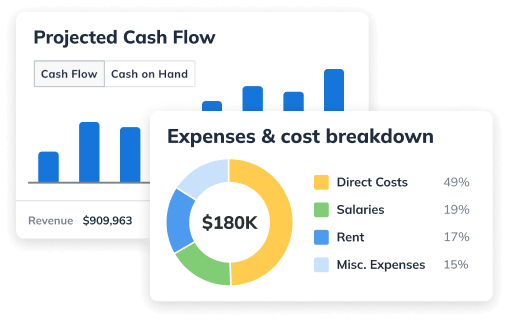
Financial charts in your pitch deck are live-linked to your LivePlan forecast. Change a projection — revenue, expenses, hiring timeline — and your deck reflects it automatically. No version mismatches. No walking into a meeting with slides that say something different from your business plan.

“LivePlan simplifies complex planning. In many ways, it feels like a structured, guided version of AI — similar to ChatGPT in clarity — but built specifically for entrepreneurs who need to transform ideas into investor-ready presentations. The step-by-step flow helps me translate my creative thinking into something tangible and professional.”
Elanna S.
NCDC Work UP
Investor-ready structure
The slides investors expect, in the order that works
The slide sequence reflects what investors actually want to see at each stage of a pitch — informed by decades of experience pitching venture capitalists, teaching entrepreneurship, and judging venture competitions. No Googling "what slides should be in a pitch deck." No guessing what comes first.

Fully customizable
A polished starting point you can make your own
Edit and customize right inside LivePlan — add slides, rearrange the order, change the design theme, update any element. When you're ready to share:
- Share a link to present online or send via email
- Export to PPTX for PowerPoint
- Export to PDF for email attachments
Update and reshare anytime — no starting over.

Because your pitch deck draws from your business plan and forecast, every improvement you make — tighter market analysis, a revised forecast, feedback from a plan review — flows through to your pitch automatically.
More than a pitch deck tool
Investor Readiness Review
Get your plan scored for investor readiness before you generate your deck. Catch inconsistencies between your narrative and your numbers — before an investor does.
A real financial model behind your charts
The financial slides in your deck pull from a working three-statement model — income statement, cash flow, and balance sheet — linked with real accounting logic. When an investor asks about your cash position, your numbers can hold up.
Market research investors can verify
Your market data is pulled from 50+ verified sources specific to your geography and segment — not a number the AI made up. When an investor asks where your market size comes from, you have an answer.
Whether you're pitching for the first time or the tenth...
Ready to pitch, not sure where to start
LivePlan turns your plan into an investor-ready deck with the structure you'd otherwise have to piece together from scratch. Show up prepared — without a week in PowerPoint.
Your forecast changed. Your deck keeps up.
Revised your projections? Your deck reflects the latest numbers automatically. Walk into every investor meeting — or board update — with current, accurate financials.
Investor gave feedback. Update your model, not your whole deck.
You're meeting with multiple investors, getting feedback, and refining your numbers as you go. When your model changes, your deck reflects it — so every meeting starts from your latest thinking.
LivePlan’s pitch deck is completely customizable. By default, it includes the following slides: Cover, high-level concept, problem, solution, how it works, target market, competitive landscape, competitive advantages, business model, customer acquisition, traction, team, financials, and the ask. Optionally slides are also available, including: roadmap, mission & impact, exist strategy, why now, and target persona. You can also add any customized slides you want to make your deck yours.
Your financial charts are connected directly to your LivePlan forecast. When you update a projection — revenue, expenses, hiring, growth assumptions — the charts in your pitch deck update automatically. There's no export-and-reimport step. The deck always reflects the most current version of your financial model.
No. The LivePlan Pitch Deck can be created from LivePlan’s Idea Canvas, or from any documents that you upload into LivePlan. LivePlan will automatically extract key information from any provided uploads and translate them into a compelling pitch deck. If LivePlan doesn’t have enough information to fill out a slide, it will just leave that slide blank and you can decide if you want to add that information or remove the slide.
AI deck tools — even ones you give a detailed prompt or upload your plan to — produce a static output. The deck looks right the day you generate it, but when your forecast changes, your strategy shifts, or an investor asks you to revise your assumptions, nothing updates automatically. You're managing two separate documents and doing the sync work yourself. LivePlan's deck is generated from your living business plan and financial charts are live-linked to your forecast — when your model changes, your deck changes. There's no separate tool to update.
Yes. The auto-generated deck is a professional starting point, not a locked template. Add slides, rearrange the order, change the design theme, and edit any element directly inside LivePlan.
PPTX (for PowerPoint), PDF (for email or print), or a shareable link for presenting online or sending via email.
The LivePlan Pitch Deck is available to all LivePlan users and is included in both the Standard and Premium tiers.
The generated deck uses a clean, professional design and the investor-standard slide structure used in real VC pitches and venture competitions. You can further customize the design theme to match your brand before sharing. What matters most to investors is that the content is specific, the numbers are real, and the structure is familiar — LivePlan covers all three.
Your financial charts update automatically — no regenerating the deck or importing new charts required. The changes flow through directly, so you can keep iterating on your model and always have a pitch deck that reflects your latest numbers.
Yes. LivePlan generates a shareable link you can send via email or use to present online. Recipients view the deck in their browser without needing PowerPoint. If you update the deck, the same link shows the latest version.
Your plan is ready. Your pitch deck is one step away
Totally risk free. 35-day money-back guarantee.