





Financial Forecasts & Scenarios
Build a budget.
Test every scenario.
Create budgets and forecasts and then test how a new hire, an equipment purchase, or a new location impacts your business before you commit.


Trusted by over 1 million small business owners


4.8/5 Google reviews

35-day money-back guarantee
Get started risk-free
Financial forecasts you can trust - No spreadsheets required
Financial forecast & budget
Finish a financial forecast for your business plan faster than ever
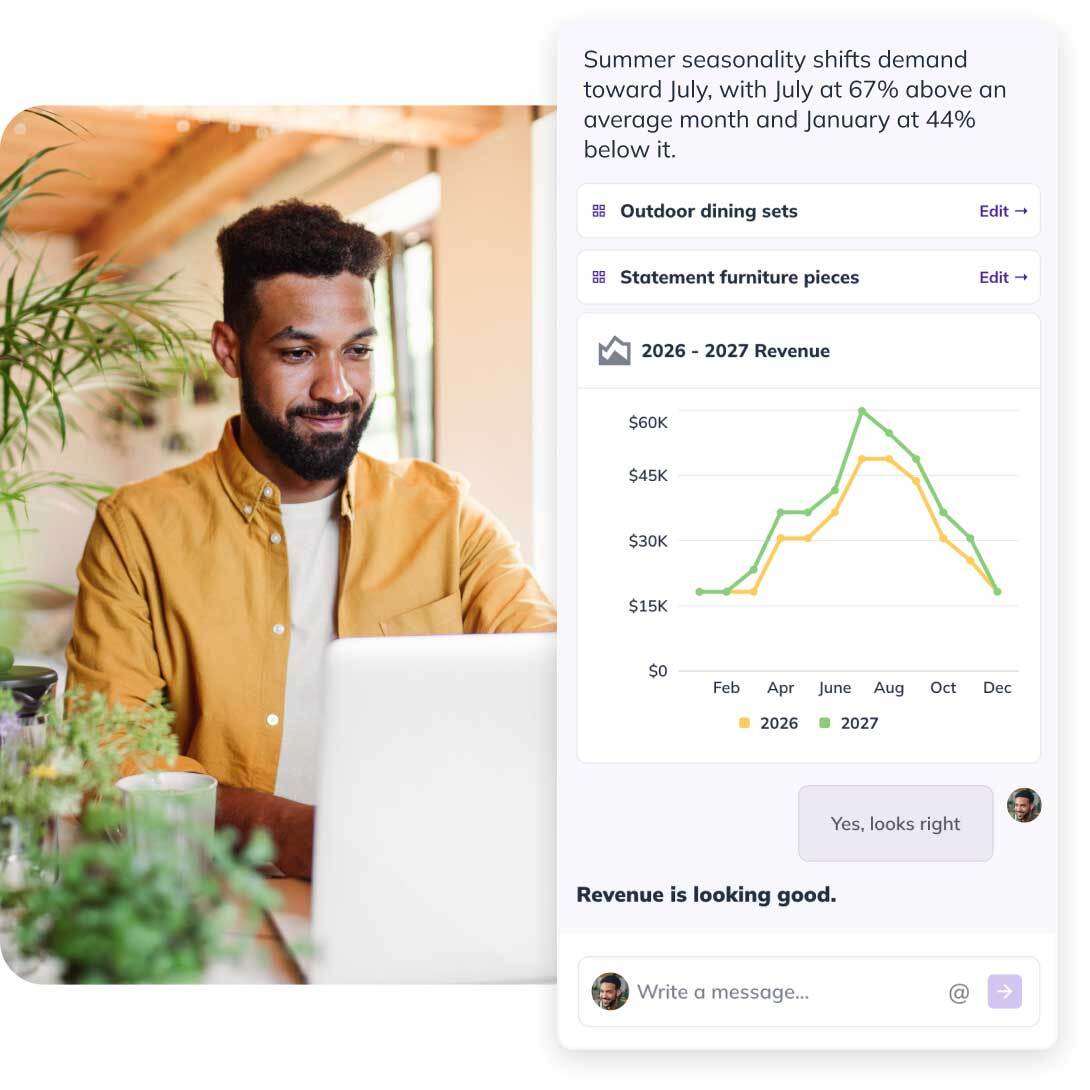
Forget the blank page and the complex formulas. With LivePlan, you build your forecast by having a conversation — ask LivePlan to suggest numbers, test a new scenario, or have it review what you've already built so you can get feedback. Every answer flows into the same connected financial model, so your plan stays complete and correct.
Already have numbers in a spreadsheet, QuickBooks, or Xero? Import them to jump-start your forecast.
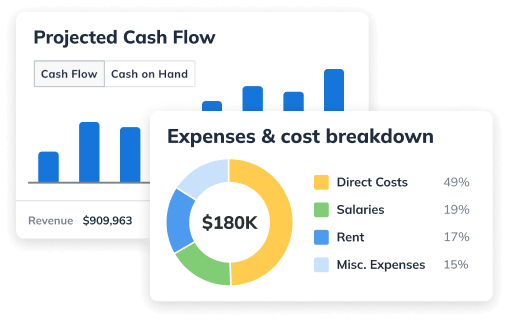
Whether you're making a decision about expanding or seeking funding, your forecast will have everything you need: sales forecast, expense budget, profit & loss statement, balance sheet, and cash flow statement.
What-if scenarios
Make smarter decisions by answering any “what-if” question
Run the decision before you make it. Add the hire, the equipment purchase, the second location, the price change, or a slow season, and see what each one does to profit and cash before you commit. Build up to 10 versions of your budget and compare them side by side. You'll find out the ideal timing for any financial decision.


“I use LivePlan for running 'what if' scenarios. What if the bank takes an extra 3 months to finance? What if sales are too poor or way too strong? LivePlan lets you run all these scenarios very quickly. This is very powerful stuff and nothing short of essential if you're expanding or starting a business.”
Kyal
ShopperApproved
Cash flow forecast
See a tight month coming
LivePlan forecasts your cash balance forward and marks the low points, so a squeeze in March shows up in January while you've still got moves to make. That's when a loan, a delayed purchase, or a nudge on receivables is still a choice rather than an emergency. Connect QuickBooks or Xero and the cash flow forecast automatically updates from your books based on what actually happened.

Budget vs. actual dashboards
See if you hit your numbers
Each month LivePlan lines your actuals up against your budget and shows whether you hit your numbers and where spending ran over, across 20+ trend reports built from your accounting data. The monthly financial review explains what changed, what's working, and what to fix next. It's the forward-looking review your accountant doesn't do.

Lender-ready statements
Bring a lender numbers in the format they expect
When you go for a loan, a line of credit, or equipment financing, the bank wants the statements, not a summary. LivePlan produces the profit and loss, cash flow, and balance sheet banks and SBA lenders ask for, built from the same budget you're already running the business on.
And if you need a complete business plan or pitch deck, you can build that in LivePlan, too.

How We're Different
More than business plan software
LivePlan is a planning system, not a document generator. Build the budget, test the decision against it, then check every month whether the business did what you said it would.
Learn MorePlenty of support to help you succeed
Ideas when you're stuck
Use the LivePlan Assistant to generate suggestions at each step, and browse 550+ sample plans to find one from your industry.
Guidance from people who've seen it work
Video walk-throughs and webinars from planning experts, built on what a million real business plans have taught us.
Someone to ask
If you ever have a question, instantly chat with a LivePlan expert. If you're pressed for time or need additional guidance, access additional services from within LivePlan.
Know what's safe to spend.
Frequently asked questions
QuickBooks records what already happened. LivePlan takes that data forward: a budget for the months ahead, a cash flow forecast that shows the tight spots before you reach them, and a monthly read on whether you hit your numbers. As one QuickBooks App Store reviewer put it: "QuickBooks keeps my accounts organized, while LivePlan transforms that data into clear forecasts, actionable insights, and easy-to-read financial reports, all without the need for manual effort." — Senthil
Financial scenario planning is the process of building more than one version of your forecast to see how different decisions or conditions would affect your business. Instead of relying on a single set of numbers, you create what-if scenarios — like a slower sales year or an added hire — and compare the outcomes side by side before you commit.
A regular forecast is your single best estimate of what's ahead. Scenario planning builds on that by letting you create and compare alternate versions — best case, worst case, or any specific what-if — so you can see the range of possible outcomes and plan for each one instead of betting on a single projection.
You can create up to 10 financial planning scenarios in LivePlan.
Yes, when you add data in LivePlan, all the charts and graphs a lender or investor would expect to see are automatically created.
You describe the business; LivePlan does the accounting. Talk to Help Me Forecast about what you sell, what you charge, and what you spend, and it turns that into a connected budget with the formulas and statement logic handled. On LivePlan Premium you can start from your QuickBooks or Xero data instead, which gets you to a working budget faster because your real cost and revenue categories are already there. Direct number entry is always available if you'd rather do it yourself.
Yes, when you create your financial forecasts in LivePlan the numbers you enter will build these statements automatically. You will end up with a complete income statement, cash flow projections, balance sheet and profit and loss statement.
A LivePlan Forecast provides the three standard (or "pro forma") financial statements that accountants and investors generally expect to see. You can create pro forma financial statements easily by connecting LivePlan to QuickBooks Online or Xero. The software will use your actual accounting data to create your starting forecast, which will be used to automatically generate these pro forma statements. You can also enter data manually instead if you don't use one of these accounting tools.
Yes, you can easily download your financial forecast as a PDF or print your forecast. With LivePlan Premium, you can also export your forecast as a .csv file and then import it into Microsoft Excel or Google Sheets.