





The 8 Best Business Plan Software Tools in 2026 — Ranked and Compared


Jump to

If you're searching for business plan software, you've already discovered the problem: there are a lot of options, and most of them look similar until you need them for something real.
Some tools are built to put words on a page. Others are built to help you walk into a meeting with a lender and defend every number in the room. Those are not the same thing — and choosing the wrong one only becomes obvious when the stakes are high.
This guide covers eight of the most common business plan software tools in 2026: what each one actually does well, where it falls short, who it's right for, and what the key differences are when you're planning for funding.
What to Look for in Business Plan Software
Before the comparisons, here's what separates genuinely useful business plan software from a document editor with a business plan template:
Financial modeling depth. A table that looks like a P&L isn’t a financial model. Real business plan software builds interconnected income statements, cash flow forecasts, and balance sheets — where changing one assumption flows through your entire forecast. That’s what lenders stress-test. See how connected financial forecasting works.
Market research quality. AI-generated market data sounds good until a lender asks you to cite a source. Look for tools that pull from verified, attributable sources — not content generated from a model’s training data. LivePlan’s market research is built around exactly this.
Investor and lender readiness. Can the tool tell you whether your plan is actually ready to submit? A readiness review that catches inconsistencies between your narrative and your numbers is worth more than a completeness checklist.
Value after launch. A business plan is most useful in the months after you start. Software that compares your real results against your forecast — every month — keeps the plan working long after you submit it.
Coverage of the full planning journey. The best tools support you from “is this idea worth pursuing?” through validation, planning, funding, and ongoing tracking — not just the document-writing stage.
The 8 Best Business Plan Software Tools in 2026
✓ full support • ⚠ partial/limited • ✗ not offered. See each tool's section below for what the checkmarks mean in practice (e.g. LivePlan's financial model is a full three-statement model; Upmetrics' is guided forecasts only).
1. LivePlan — Best Overall Business Plan Software
Best for: Entrepreneurs seeking funding, validating an idea, or running a business with real financial visibility. Includes trained AI and only pulls research from validated sources you can cite.
LivePlan is the only business plan software built to cover every stage of the planning journey — from “is my idea worth pursuing?” to validating it with real research, building a plan with connected financials, reviewing it before you submit, pitching it to investors, and tracking your results against the plan after you launch.
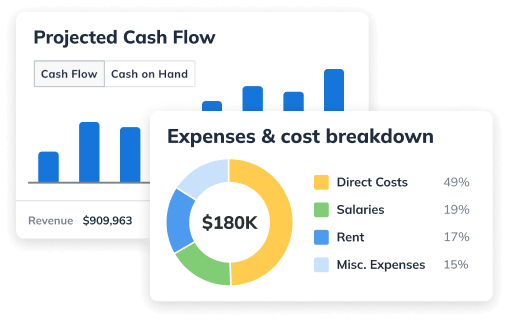
The core differentiator is the financial model. Where most tools give you a spreadsheet template to fill in, LivePlan builds a true three-statement model — income statement, cash flow, and balance sheet — connected by real accounting logic. Change one assumption, and it flows through your entire forecast. That’s what makes it defensible when a lender asks what happens to your cash position if revenue comes in 20% below plan.
What LivePlan Does
Idea Validation (Idea Canvas). Before you write a single word of a business plan, LivePlan’s Idea Canvas guides you through your entire business model with guided AI that challenges weak assumptions, surfaces real market research with cited sources, and gives you honest risk assessments at every step. Not a 20-second score — a structured, section-by-section evaluation that identifies your biggest blockers and suggests specific pivots to strengthen them. Everything carries forward when you’re ready to write the full plan. See how it compares to other frameworks in Idea Canvas vs. Lean Canvas vs. Business Model Canvas.
Reference Files. Upload your existing documents — ChatGPT drafts, voice memos, competitor research, notes — and LivePlan uses them throughout. Your AI writing, market research, and financial forecasts are all grounded in LivePlan’s trained business planning expertise and what you’ve already built, not generic output.
Import Your Plan. Already have a plan started somewhere else? LivePlan can take a plan in any format, from any source, and import it in — so you don’t start over. Bring your existing work and pick up from there.
AI Market Research. LivePlan pulls from 50+ verified real-world sources — including bank-grade industry benchmarks from a professional research firm — to build market research specific to your business, your segment, and your location. Every data point is attributable. When a lender asks where your market size figure came from, you have an answer.
Business Plan Builder. A collaborative, professionally designed editor where AI writing is grounded in what you’ve told LivePlan about your actual business, and the business plan structure is backed by decades of business planning expertise. Import existing work, use Help Me Write to draft or refine sections, and publish a plan that looks like it was built by someone who takes their business seriously — beautifully designed templates, embedded financial charts, and an export that arrives on a lender’s desk looking polished.
Financial Forecasting. The real three-statement model — P&L, cash flow, and balance sheet — with AI suggestions built in. Change one revenue assumption and watch it flow through the entire forecast. This is not a generated table; it’s a working model a lender can stress-test.
Plan Review. Before you submit, Plan Review gives your plan a section-by-section funding readiness assessment. It checks for inconsistencies between your narrative and your numbers, surfaces the gaps a funder is most likely to flag, and generates the specific questions you’re likely to face in the meeting — with pro tips on how to prepare strong answers. Fix the problems before you’re in the room.
Pitch Deck Builder. When your plan is ready, LivePlan’s AI-powered pitch deck builder turns it into a polished funding presentation — pulling directly from your plan content and financials, so your slides stay current with your numbers automatically. Update a projection and the relevant slides reflect it. Built on templates informed by decades of experience pitching investors and judging venture competitions.
Plan vs. Actual. With LivePlan Premium, connect QuickBooks Online or Xero and LivePlan compares your real results against your plan every month. Know what’s on track, what’s drifting, and what to adjust — before it’s too late to course-correct.
LivePlan Pricing
- Standard: $20/month ($15/month billed annually) — plan building, forecasting, market research, pitch deck
- Premium: $40/month ($30/month billed annually) — adds QuickBooks/Xero sync, Plan vs. Actual, industry benchmarks, and what-if scenarios
- 35-day money-back guarantee on both plans
Who LivePlan Is Right For
Anyone who needs a business plan that will face real scrutiny — a bank loan, SBA financing, investor pitch, or partnership discussion. Also, the right choice for established business owners who want to track results against their plan month over month (choose Premium for accounting sync and Plan vs. Actual).
2. Upmetrics — Best for Affordable Plan Quick Drafting
Best for: Founders who need a plan document quickly and aren’t expecting close scrutiny of their financials
Upmetrics is a well-designed tool for writing a formatted business plan. The interface is clean, the AI writing assistant is helpful, albeit generic, for drafting narrative sections, and a broad library of industry-specific templates gives first-time plan writers a concrete sense of what a finished plan looks like.
Where it falls short is in depth. Upmetrics provides guided financial forecasting — but not the fully interconnected three-statement model with real accounting logic that lenders stress-test. You really need to understand your financial model and work through it yourself. The AI support in the financials is pretty basic and generic. Market research is AI-generated rather than pulled from verified, citable sources. There’s no plan review feature and no idea validation stage. Its Premium plan can sync with QuickBooks Online and Xero, but the platform is built around plan creation rather than structured month-over-month plan vs. actual tracking. Once the document is written, the tool’s usefulness largely ends.
For a plan you’re submitting to anyone who will look closely at your numbers or ask where your market data came from, those gaps matter.
Pricing: Premium at $19/month ($14/month billed annually) | Professional at $37–$49/month. (Upmetrics discontinued its former $9/month Starter plan.) 15-day money-back guarantee.
Here is a detailed side-by-side comparison
3. IdeaBuddy — Best for Early-Stage Idea Exploration
Best for: Founders in the early ideation phase who want structured guidance before committing to a full plan
IdeaBuddy takes an idea-first approach. The core product is a business idea canvas that walks you through your business model section by section — value proposition, target market, revenue streams, competitive landscape — before you get to a formal business plan.
The canvas format is genuinely helpful for organizing early-stage thinking, and the guided structure prevents blank-page paralysis. There’s also basic financial projection functionality for exploring rough numbers.
The limitations show up when you need to move from ideation to a fundable plan. The financial model is basic, there’s no verified market research, and there’s no investor readiness review. IdeaBuddy is a starting point for thinking, not a finishing tool for funding — that’s where a structured Idea Canvas with real research becomes useful.
Pricing: Free plan available | Dreamer: $15/month | Founder: $20/month | Team Pro: $25/month (monthly billing); significant discounts on annual plans
4. Bizplan — Best for Startup Education and Funding Resources
Best for: First-time founders who want educational resources alongside planning tools
Bizplan combines a business plan builder with educational content on startup planning and access to a funding platform that claims to have helped raise capital for startups. If you’re approaching your first business plan with very limited business knowledge and want to learn as you build, the educational resources can be helpful.
The planning tool itself is straightforward but limited — basic financial tools and a guided plan structure without the depth of a dedicated financial modeling tool. The broader value proposition is really the education and community, not the plan software.
Pricing: $29/month | $20.75/month billed annually ($249/year) | $349 one-time lifetime access. All three tiers include the same features.
5. VentureKit — Best for Speed with Generic AI
Best for: Founders who need a formatted plan document quickly and are comfortable with generic AI-generated content
VentureKit uses AI to generate a full business plan draft from your inputs — business description, target market, and basic financial assumptions. It’s fast, and the output is formatted and readable.
The trade-off is the same as with all instant-generation tools: the content is AI-generated from your prompts, not grounded in verified research or real market data. The financial output covers the standard statements, but doesn’t function as a working, interconnected model you can stress-test. There’s no readiness review and no plan-versus-actual capability.
VentureKit makes sense if you need a structured starting document quickly and plan to revise it substantially. It doesn’t make sense if that document will face scrutiny from lenders or investors without significant additional work — see the pros and cons of using AI for business planning for more on where generic AI output falls short.
Pricing: Free (up to 3 full plans/month) | Pro: $16/month, or $8/month billed annually
Here is a detailed side-by-side comparison
6. VenturePlanner — Best for AI-Enhanced Presentation
Best for: Founders who want a visually polished AI-assisted plan with design customization
VenturePlanner positions itself as an AI-enhanced business planning tool with an emphasis on visual presentation — themes, charts, and visual elements within the plan document. It uses an interactive, question-based AI process to build the plan, with a library of design options.
The financial capabilities are basic, market content is AI-generated rather than sourced from verifiable research, and there’s no investor readiness review. The pitch is primarily around presentation quality and AI assistance for writing, rather than the rigor of the underlying plan.
Pricing: Free account tier available; paid plans run roughly $29/month for individual businesses, with a higher-priced consultant/agency tier. Reported pricing varies by source — check ventureplanner.ai for current rates. 30-day refund guarantee.
7. 15MinutePlan — Best for a Fast, Low-Cost Document
Best for: Entrepreneurs who need a formatted plan document at a low cost with no ongoing subscription
15MinutePlan positions itself around speed — a business plan in 15 minutes via a guided questionnaire and AI generation. It’s priced as a one-time payment rather than a subscription, which makes it attractive for people who need a plan for one specific purpose and don’t want ongoing software costs.
What you get is a formatted document, not a business planning system. There’s no market research, no financial modeling, no review tool, and no ongoing tracking. If the plan will be submitted to anyone who evaluates it closely, the limitations will be apparent.
Pricing: One-time packages reportedly range from $69 (Starter, up to 3 plans) to $99 (Professional, up to 10 plans). Pricing isn’t published on the company’s website, so verify current rates at checkout.
8. ChatGPT / Claude — Best for Brainstorming (Not a Standalone Solution)
Best for: Getting your initial thinking organized or drafting rough content to import into a real planning tool
AI assistants like ChatGPT and Claude have become the first stop for many founders thinking through a business idea. They’re fast, flexible, and surprisingly helpful for brainstorming, drafting narrative sections, and thinking through early assumptions.
What they can’t do is build a financial model. They can write a table that looks like a P&L — but the statements aren’t connected, the cash flow logic isn’t real, and if a lender asks what happens to your cash position if revenue comes in 15% below plan, the model can’t answer that question. Market research pulled from a chat session is AI-generated without verifiable sources. There’s no readiness review, no plan structure, and no ongoing tracking.
AI assistants are a useful starting point for content. They’re not a substitute for business plan software — and the founders who’ve learned that lesson the hard way are often the ones who ended up in LivePlan after the bank meeting didn’t go as expected.
The good news: if you’ve done work in ChatGPT already, LivePlan’s Reference Files let you import that work and build from it — so nothing you’ve done is wasted. See how to use ChatGPT to write a business plan the right way.
Here is a detailed side-by-side comparison
How to Choose the Right Business Plan Software
The right tool depends on what you're actually building the plan for.
If your plan will face lender or investor scrutiny — a bank loan, SBA financing, or investor pitch — you need software that builds a real financial model, sources market research you can defend, and gives you a readiness check before you submit. LivePlan is the only tool in this category that does all three.
If you’re still figuring out whether your idea is worth pursuing, LivePlan’s Idea Canvas is designed specifically for this stage — structured validation with real research and honest risk assessments, before you commit to writing a full plan.
If you need a rough draft fast and plan to do substantial editing work yourself, a tool like VentureKit or Upmetrics can give you a starting point to react to. Just know what you’re getting: a document, not a model.
If you’re an established business owner who wants to track results against your plan every month, the plan vs. actual capability — and the QuickBooks/Xero integration in LivePlan Premium — makes LivePlan the only tool in this list built for that stage.
Frequently Asked Questions
LivePlan. Bank loan officers and SBA lenders look closely at your financial projections and expect a working three-statement model — not just a formatted table. LivePlan’s financial forecasting builds interconnected income statements, cash flow statements, and balance sheets with real accounting logic. It also includes a Plan Review that checks your plan for the exact issues lenders flag most often, and generates the questions you’re likely to face in the meeting.
VentureKit offers a free tier that generates up to three full business plans per month. IdeaBuddy has a limited free plan for idea exploration, and VenturePlanner offers a free account tier. None of the free options builds a real financial model or includes market research from verified sources. If you're building a plan for internal purposes only, a free tool may be sufficient. If the plan will be reviewed by a lender or investor, the limitations of free tools become significant quickly.
ChatGPT is useful for drafting narrative content and organizing your thinking. It can’t build a real financial model, source verifiable market research, or tell you whether your plan is ready to submit. Many founders use ChatGPT for early drafting and then bring that work into LivePlan — which accepts imported documents in any format — to build the plan into something defensible. See how to use ChatGPT to write a business plan for the full approach.
The most significant differences are in financial modeling depth, market research sourcing, and post-submission features. LivePlan builds a true three-statement financial model (interconnected P&L, cash flow, and balance sheet) that lenders can stress-test. Upmetrics provides guided forecasting without that depth of interconnected accounting logic. LivePlan pulls market research from 50+ verified sources with attributable citations. Upmetrics generates market content via AI without source citations. LivePlan includes a Plan Review that checks your plan before you submit and generates funder Q&A. Upmetrics doesn’t have a plan review feature. LivePlan Premium connects to QuickBooks and Xero for structured monthly plan vs. actual tracking; Upmetrics offers accounting sync but is built primarily for plan creation. See the full LivePlan vs. Upmetrics comparison.
Pricing ranges from free (limited tools) to $20–$50/month for full-featured platforms. LivePlan starts at $20/month with a 35-day money-back guarantee. Upmetrics starts at $19/month ($14/month billed annually). Most tools offer discounts on annual billing. One-time purchase options exist as well — 15MinutePlan’s packages reportedly start at $69, and Bizplan offers lifetime access for $349 — but one-time tools generally offer limited capability compared to subscription platforms.
Yes. LivePlan accepts plans in any format from any source — including ChatGPT exports, Word documents, PDFs, and plans started in other tools. Import your existing work and continue building from there without starting over.
The Bottom Line
Most business plan software will help you produce a document. The difference between tools shows up when the document faces real scrutiny.
If you're writing a plan for your own clarity, almost any tool will do. If you're submitting it to a bank, presenting it to investors, or using it to run a real business — you need software that builds a working financial model, grounds its research in verifiable sources, and can tell you honestly whether the plan is ready before you're in the room.
LivePlan is built for that. Every other tool on this list covers some part of what you need. LivePlan covers the full journey.
Additional resource: How to write a business plan step-by-step

Sabrina Parsons
Sabrina has served as CEO of Palo Alto Software since 2007. She and her husband, Noah, founded a UK software distribution company in 2001 that was acquired by Palo Alto Software in 2002. Sabrina is a successful Internet expert, having served as Director of Online Marketing at Commtouch, Senior Producer at Epinions, and founder of her own Web consulting company, Lighting Out.

More in Planning

planning
Good Market Research Makes Better Pitches — and Better Plans

planning
How to Write a Laundromat Business Plan + Example Templates

planning
What Entrepreneurs Really Think About Using AI to Write Business Plans

planning


